CuteHotspot. Wi-Fi Hotspot Software
Documentation
Customers
There are three types of customer accounts in CuteHotspot:
1. Guest. This is a customer account which you can use for any customer.
2. Member. Any customer which has balance in your cyber cafe. You create member accounts manually.
3. Ticket (time code). Pre-generated account which can be sold to any customer. You generate a number of tickets for further use.
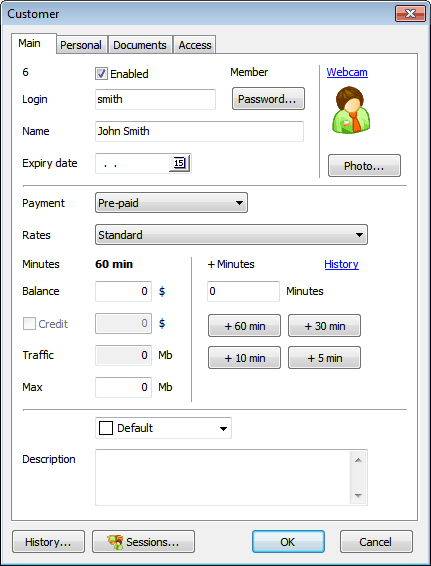
Customer account
|
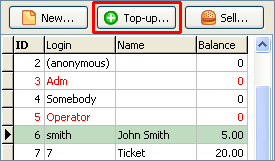
Add time/money (top-up)
Select a customer in the list and click the "Top-up" button:
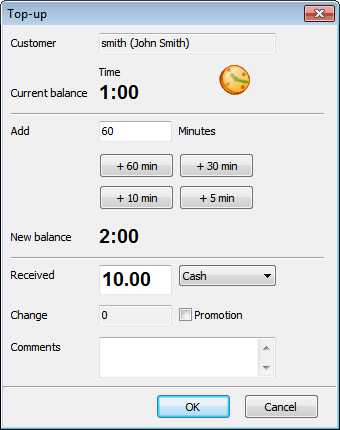
Enter time/money amount, select a payment method (cash, credit card):
Use the Promotion option to top-up an account without charging any real money. Promotion amounts are displayed in the reports separately.
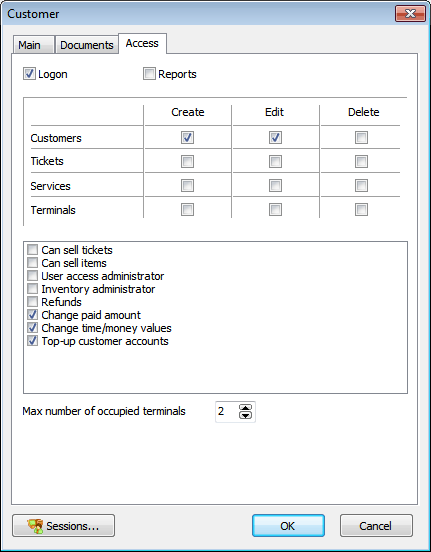
Security
 | Only a supervisor account (Adm) or a "User access administrator" can change user security settings. |
|
The other options are:
- Top-up customer accounts
- Start sessions
- Extend sessions
Adm account rule. Administrator account (Adm) security settings can be changed by Adm user only. Administrator can change the security settings of any user account.
Login name rule. An operator can set an account login name when he creates a new user account. An operator can't change his own login name. Administrator and user security administrators can change any login name.
Password rule. An operator can set a password when he creates a new user account. Any user can change his password. Administrator and user security administrators can change any password.
Enable/disable account rule. Only administrator and user security administrators can enable/disable a user account.
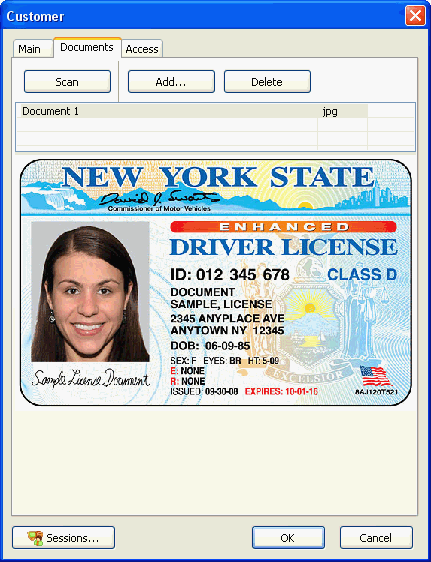
Scan customer documents
Scan customer documents such as a photo, passport, driving license, etc. Click on the customer icon to scan a photo or use the Documents tab to scan any other documents.
CuteHotspot. Friendly Hotspot Software
Copyright © 2008-2013 TrueCafe, Ltd.
All rights reserved.